
Accidentally deleting videos from your wedding ranks pretty high on the list of things you never want to happen. But it still did. Panic sets in fast — and understandably so, because wedding footage is not something you can just reshoot.
The good news is you can still recover deleted videos if they haven’t been overwritten. In this guide, we’ll walk through exactly what to do in a situation like this, so your footage has the best possible chance of coming back intact.
What to Do Right After You Delete Wedding Videos
Before anything else, there’s one thing that matters most right now: stop using the device immediately.
When files are deleted, they are not erased right away. The system removes their reference, but the data itself can remain on the storage for some time. That space becomes available for new data, and once it is replaced, recovery is no longer possible.
So the priority is simple: don’t record, don’t copy, and don’t save anything to that device.
After that, what you do next depends on how the files were deleted.
If the Files Were Deleted from a Computer
If you happened to transfer your wedding videos from the camera to your PC before deleting them, the situation might be easier. There are a couple of simple things to check first.
- Check the Recycle Bin or Trash
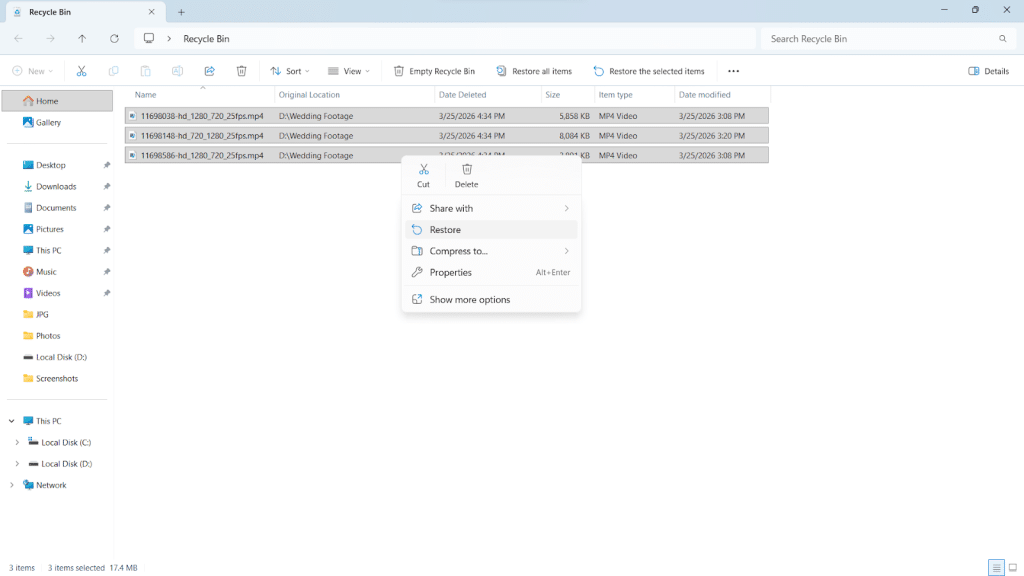
On Windows, deleted files usually go to the Recycle Bin unless you used Shift + Delete. Open it, locate your videos, right-click them, and choose “Restore.” They will return to their original folder.
On Mac, open the Trash, find your files, right-click, and select “Put Back.” This restores them to their previous location.
- Check backups and synced storage
The files may still exist in a backup. Many people have automatic sync running without thinking much about it, or simply saved copies somewhere else and forgot about it. Either way, it is worth checking:- iCloud Photos or Google Photos
- Google Drive, OneDrive, or similar services
- External hard drives used for file transfers.
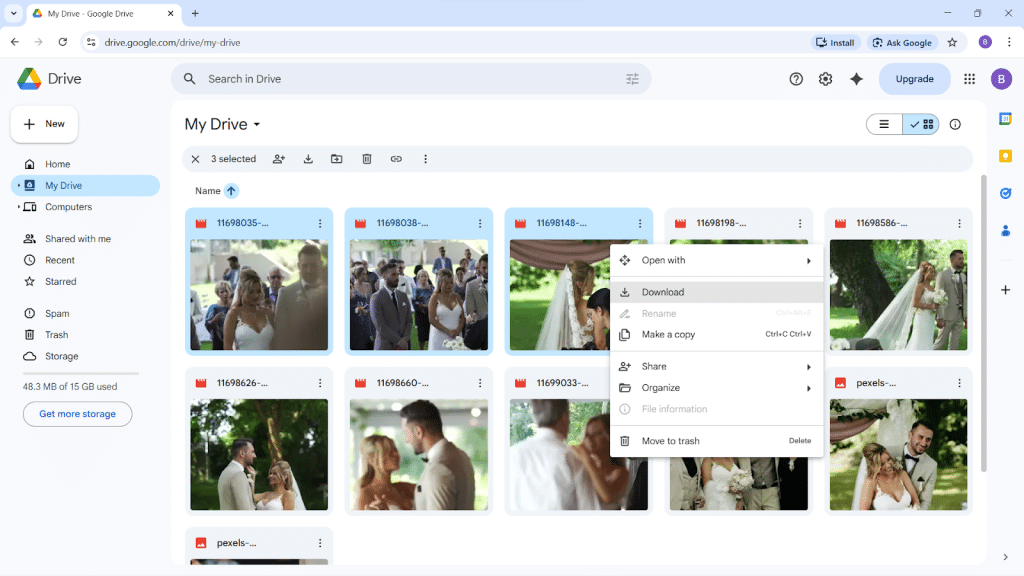
Log into the relevant service or plug in the drive and search by date. Just keep in mind that this only works if the backup was created before the deletion happened.
One more thing worth trying before moving on: if you hired a videographer for the wedding, reach out and ask whether they still have the raw footage on their end. It is not guaranteed, but many videographers hold onto original files for a period of time after delivery. You might get lucky and skip the recovery process entirely.
When files are nowhere to be found, you may still be able to recover them from the drive itself. In this case, you’ll need recovery software, which we’ll cover later on in this article.
If the Files Were Deleted Directly from the Camera or SD Card
This is a more common scenario and comes with fewer quick solutions. Cameras do not have a recycle bin, so deleted wedding videos disappear from view immediately. And in most cases, there was no chance to copy them elsewhere beforehand. However, the footage often still remains on the memory card until something replaces it.
What you should do right now:
- Take the card out of the camera and set it aside.
- Do not put it back into the camera.
- If you plug the card into a computer, decline any prompts asking you to format or repair the drive.
At this point, recovery software becomes the main way to recover deleted footage safely. Follow the next steps carefully and avoid doing anything extra — every unnecessary action on the card is a risk you do not need to take.
How to Recover Deleted Wedding Videos Using Software
When the quick fixes didn’t work, recovery software is where most people get their files back. It’s actually not as technical as it sounds. You don’t need any special skills or equipment, just a computer, a card reader for a memory card, and a bit of patience.
Why Software Works Best to Recover Deleted Photos and Videos
Recovery software works by scanning the storage device sector by sector, looking for files that are no longer visible in the file system but haven’t been overwritten yet. Once the scan is complete, it presents you with a list of recoverable files that you can preview and restore.

It’s non-invasive, runs entirely from your own computer, and doesn’t require sending your card or drive anywhere, which makes it the most practical option when the simple fixes haven’t worked out.
There are several solid options available — you can find a software list comparing the top tools for video recovery if you want to weigh your choices. For this guide, we’ll use Disk Drill, which is one of the most widely used data recovery tools and typically the first one people reach for in situations like this.
Step-by-Step Recovery Process Using Software
As an example, we will walk through how to recover deleted SD card data, but the process is nearly the same for other storage devices. Whether your files were on a computer, USB drive, or external disk, the steps remain very similar. So follow along either way.
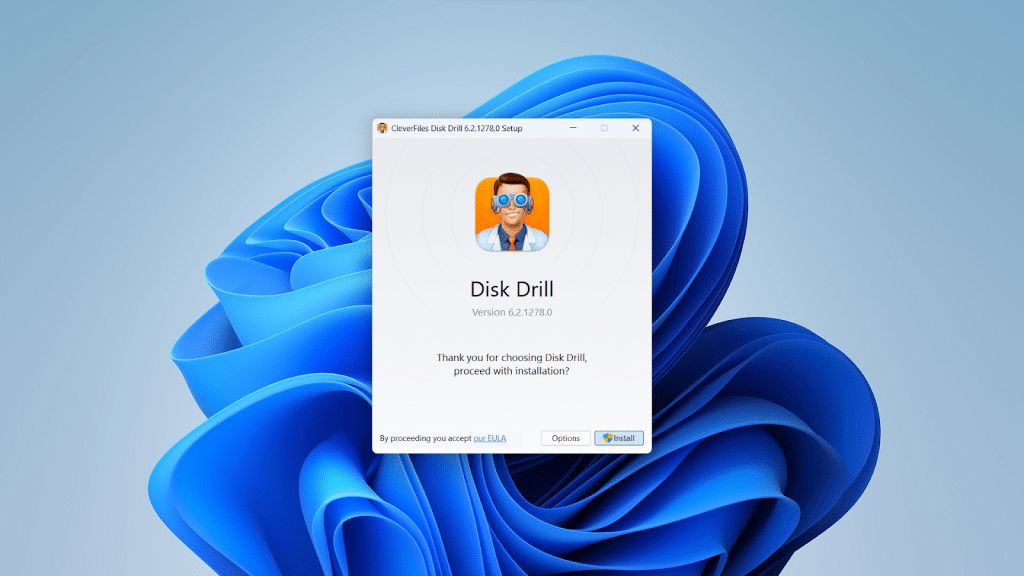
- Download and install Disk Drill on your computer.
Important note: do not install anything on the same drive or card you’re recovering from. If you’re recovering files from an SD card, you can safely install Disk Drill on your main system drive.
- Сonnect SD card via a card reader.
Most cameras, when connected to a computer, do not give recovery software the storage access it needs to perform a proper scan, so plug the SD card directly into your computer using a USB card reader.
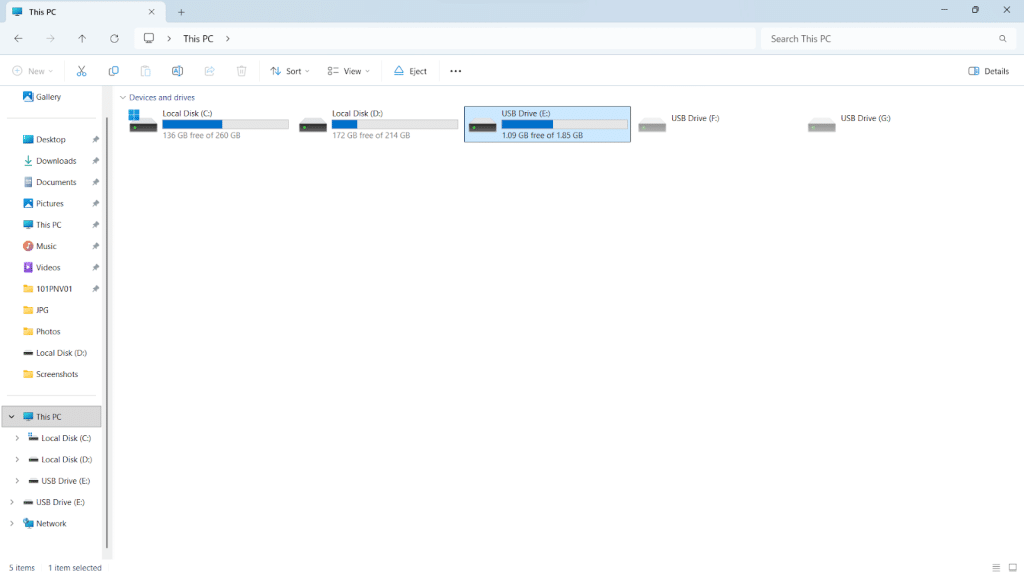
- Open Disk Drill and select the SD card from the list of drives.
It will appear as a removable device. Make sure you select the correct drive before proceeding.
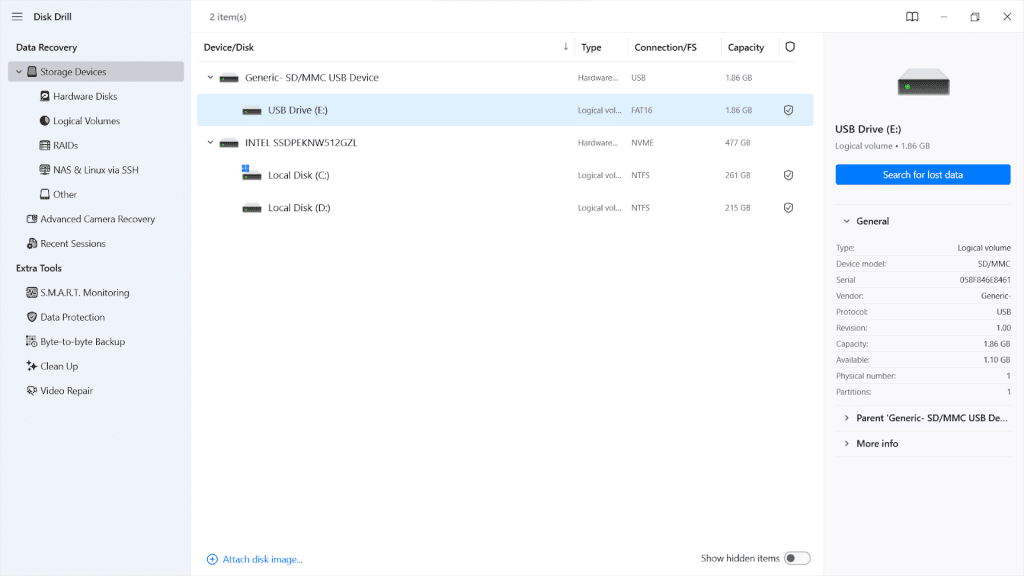
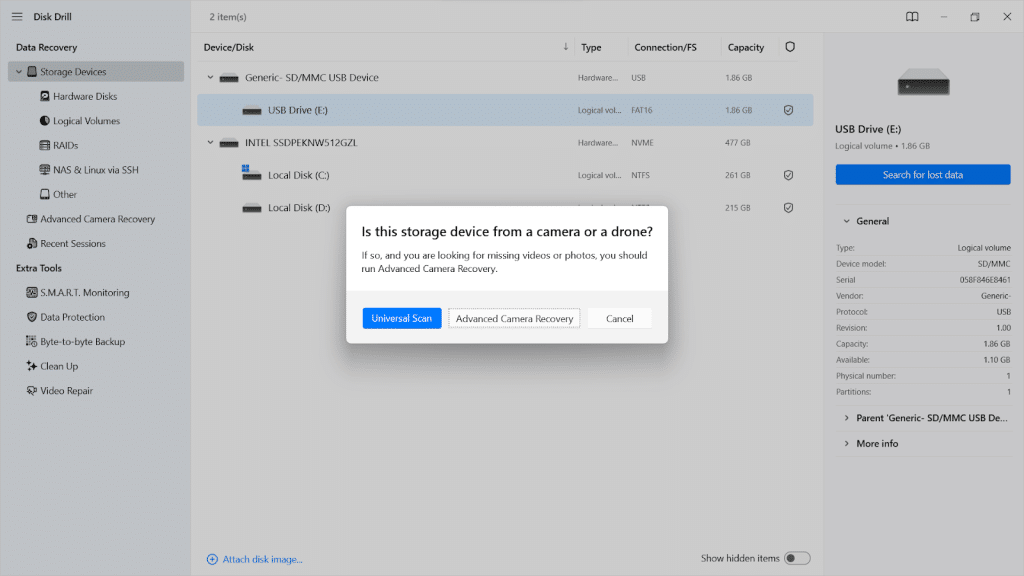
- Click “Search for lost data” and select “Universal Scan.”
The software will first look for recently deleted files and then continue with a deeper analysis to find anything else that can be recovered.
If the results don’t include your videos, or the recovered files appear broken or won’t play correctly, run “Advanced Camera Recovery” as a second scan. Some cameras store video in fragments, and this mode is designed to reconstruct full clips from those pieces.
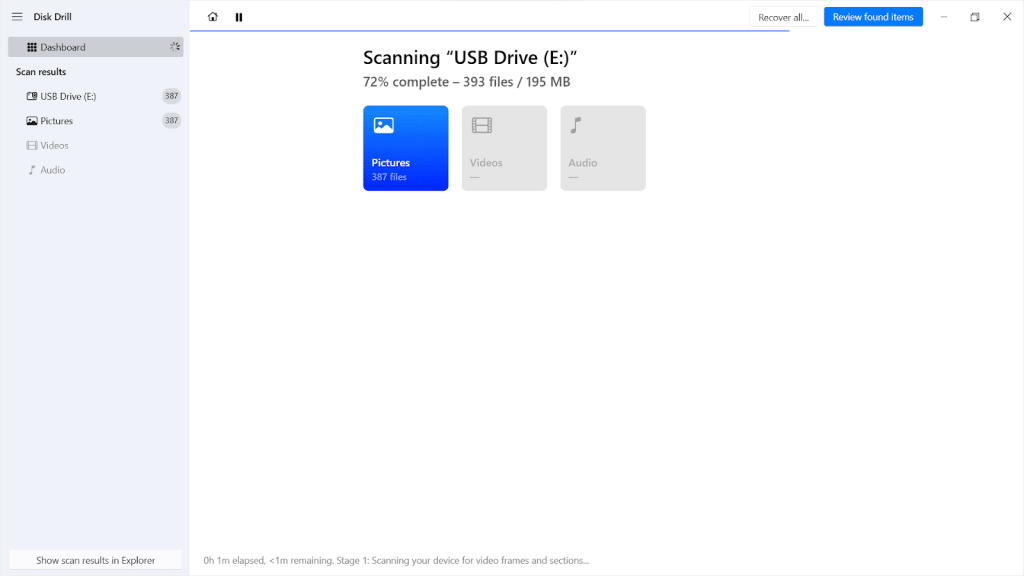
- Wait until the scan is complete.
The scan may take some time, especially on larger cards. It’s important to let it finish fully. Stopping early can mean missing files that are found later in the process, as deeper scan stages continue to uncover more data.
- Preview the recovered files and select the ones you need.
Once the scan finishes, you’ll see a list of recoverable files. Most video formats can be previewed directly inside Disk Drill before you recover them, so you can confirm the footage is intact.
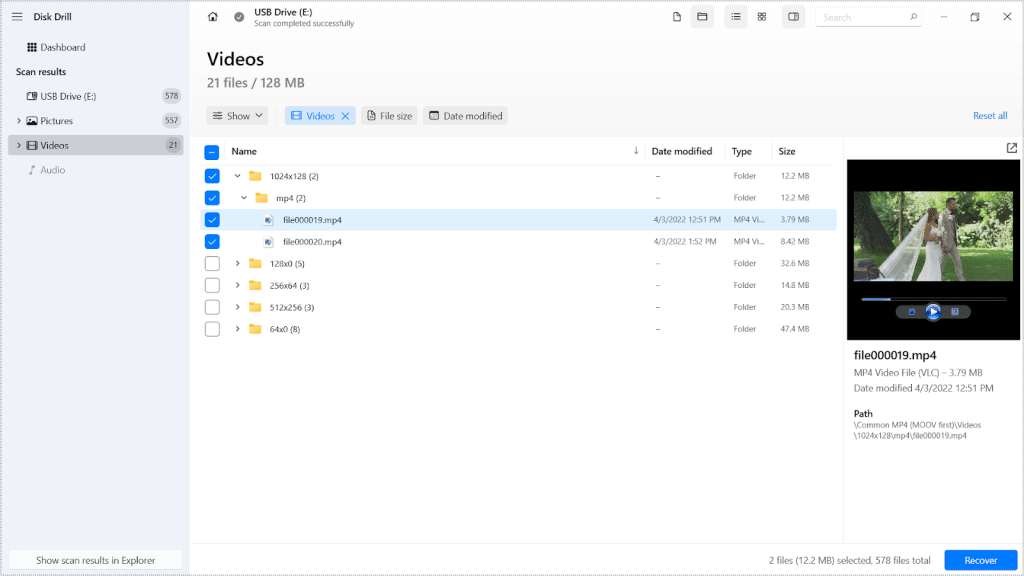
- Click “Recover” and save them to a different drive.
Recovering to the same card risks overwriting other files you haven’t retrieved yet.

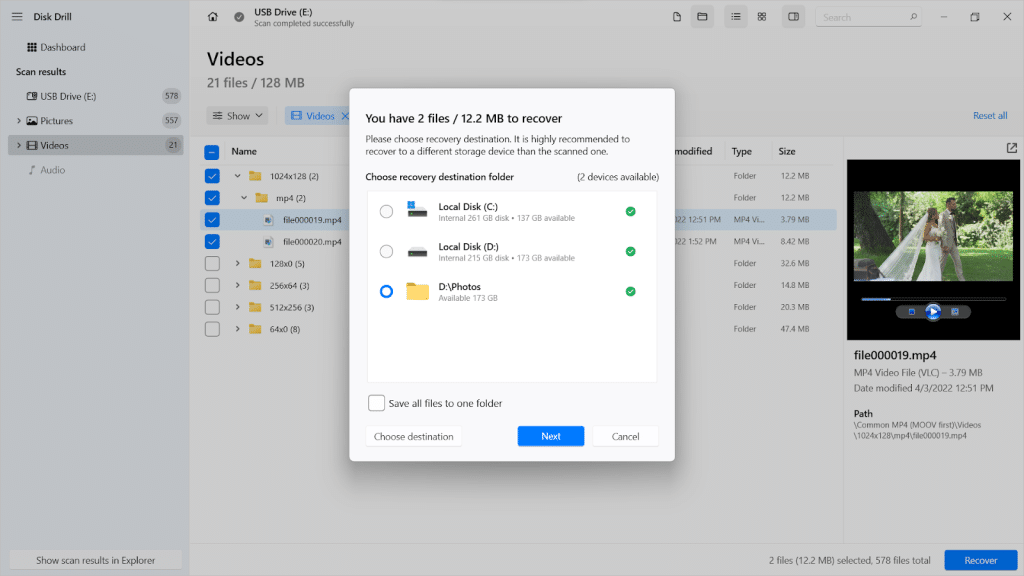
- Check the recovered files in your selected folder.
Open the location where you saved the files and confirm they are there.

When to Consider Professional Help to Recover Deleted Footage
For most cases of accidental deletion, software is enough. Still, there are situations where results are incomplete or uncertain.
Before anything else, it’s important to set expectations clearly. No recovery service, no matter how advanced, can bring back files that have already been overwritten. Once new data takes that space, the original footage is gone for good. That applies to both software and professional labs.
So when does it make sense to seek outside help?
- You don’t feel comfortable running recovery software yourself and prefer someone to handle it carefully.
- The software scan did not return the footage you expected, or the recovered files are incomplete.
In either case, a data recovery lab can take over and attempt a more thorough approach.
There’s also a practical side to consider. Professional recovery can be expensive, and the price often depends on the complexity of the case. But for something as personal as wedding footage, it’s worth trying.
What to Do After You Recover Deleted Videos
Getting your files back feels like a relief. But this is also the moment where a small mistake can undo all that progress. Once you recover deleted wedding videos, the goal shifts from finding them to keeping them safe.
Start with a few simple steps. They don’t take long, but they make a real difference.
- Make sure your videos open and play without issues
Start by verifying that the recovered files actually open and play correctly. Don’t assume they’re fine just because they appeared in the recovery list. Open each one and check that the video and audio are intact. Some files may have recovered partially, especially very long clips recorded right before the deletion happened.
If you also had to restore deleted photos from an SD card, take a quick look through them to make sure nothing is missing or out of order. It’s easier to catch gaps now than later.
- Save your files in multiple locations
Keep at least two copies in different places. For example, store one on your computer and another on an external drive. Adding a cloud backup on top of that is also a good idea — unlike a physical drive, it is not affected by hardware failure, loss, or accidental damage, so it acts as a reliable safety net even in worst-case scenarios. - Organize everything right away
Rename files, sort them into folders, and keep things clear. Recovery software often returns files with generic names or timestamps. Labeling them while the details are still fresh saves a lot of time when you’re editing or sharing clips later.
FAQ
Do memory cards overwrite deleted videos automatically?
No, not on their own. A memory card does not erase deleted files until new data is written over them. If you stop using the card right after deletion, the original footage often remains untouched and recoverable.
Can I restore deleted photos from a DSLR camera or recover videos directly from it?
No, recovery doesn’t happen through the camera itself. To recover deleted photos or videos from a DSLR camera, you need to remove the SD card and connect it to a computer. From there, you can use recovery software to scan the card and bring back deleted files.
Can I recover deleted wedding footage recorded on an iPhone?
You can recover deleted iPhone wedding videos in two cases: the video is still in the “Recently Deleted” album (it stays there for 30 days), or you had an iCloud or local backup made before the deletion. Apple’s support page on how to restore files from Recently Deleted walks through this clearly.
If neither is true, recovery is very limited. iPhones constantly write new data in the background, which quickly replaces deleted files, and third-party software has little access.
Can videos still be recovered if they don’t open after recovery?
Sometimes, yes. This usually means the file was only partially restored. Large video files are often stored in segments, and if part of the data is missing, the file may not open properly. Try running a deeper scan or using a tool that supports advanced video recovery. Some programs can reconstruct fragmented files, especially for camera footage.

A video that still won’t play after advanced recovery may have been damaged during the original recording rather than during deletion. In that case, it’s worth looking into video repair tools that can fix corrupted footage.
Can I recover deleted wedding photos and videos if I used the SD card after deletion?
Using the SD card after deletion means new data may have overwritten the space where your files were stored, which lowers the chances of recovery. That said, brief use does not always mean the files are gone. The sooner you stop and run a scan, the better your chances of getting something back.
Final Thoughts
If there’s one takeaway, it’s this: don’t rush. Most mistakes happen in the moments after the deletion. A quick format, continued use of the card, or a rushed fix attempt can do more harm than the original action. Pause, follow the steps, and let the software do its job.
With your footage recovered, take a moment to actually watch it. Not just to check that everything plays, but to enjoy it. After all, that’s the whole point of getting those videos back.


